Locations
Locations are a way of mapping appointment elements to the physical places where users in your account operate. For example, certain resources might only exist in one location and certain appointment types may only exist in others.
Location details can also be merged into reminder messages sent to clients.
Why use locations
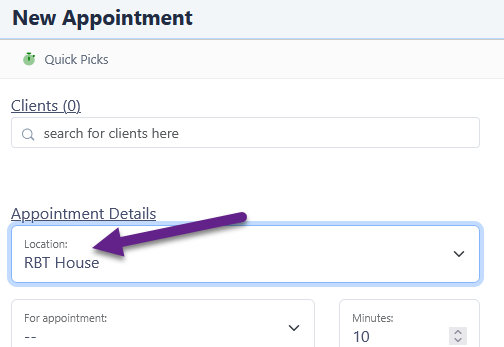
The main advantage of using locations is reducing the options shown when making an appointment. By first selecting where the appointment is taking place, the appointment type, reminder settings and resource selections will only show what is available in that location — making the booking process faster and less prone to error.
Setting up locations
Adding a location
- Go to Settings
- Choose Locations
- Click Add Location in the toolbar
- Enter the location details
The name of the location is what is used to select it in other parts of diarybook. It can also be merged into a reminder message.
The remaining fields are optional and are used solely for merging into reminder messages:
| Field | Purpose |
|---|---|
| Address | The physical address of the location |
| Contact details | Phone number or other contact information |
| Directions | How to get there |
| Map graphic | An image of the location — for email reminders only |
Assigning locations to appointment types
- Go to Settings
- Choose Appointment Types
- The list contains a Location column
- Add or edit an appointment type to assign a location to it
Appointment types that do not have a location assigned will always be available for selection when making an appointment, regardless of which location is chosen.
Assigning locations to rooms and equipment
- Go to Settings
- Choose Rooms and Equipment
- The list contains a Location column
- Add or edit a resource to assign a location to it
Resources that do not have a location assigned will always be available for selection when making an appointment, regardless of which location is chosen.
Assigning locations to reminder settings
- Go to Settings
- Choose Reminder Settings
- The list contains a Location column
- Add or edit a reminder setting to assign a location to it
Where possible, use location-less reminder settings that use merge fields to indicate the appointment location. This keeps the list of reminder settings manageable, makes message maintenance easier and helps ensure communications are consistent across the account.
Using Locations
When making an appointment, when there are locations set up, a new drop-down control is visible.